




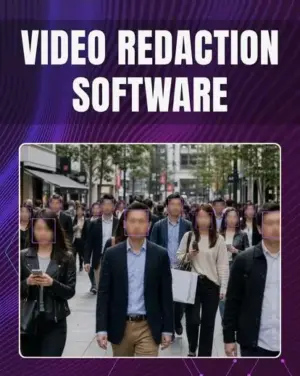



AI-Powered Video Redaction Software for Secure Privacy Compliance
Automatically detect and blur faces, heads, license plates, and sensitive visual information in seconds.

Redacting sensitive information from videos manually can take hours of frame-by-frame editing. And even one missed face, license plate, or spoken detail can create serious privacy violations, legal risks, and compliance failures.
Auto Video Redaction Software solves this problem with AI-powered automatic detection and tracking that continuously blurs faces, heads, license plates, and sensitive objects throughout the entire video.
This leads to faster workflows, improved privacy protection, and compliance-ready footage without manual effort.
See The Difference This Software Makes

Key Features: Everything You Need in Video Redaction Software
• AI Face & License Plate Detection
• 100% Offline Processing
• Audio Redaction Tools
• Broad Format Support
• Smart AI Object Tracking
• Multiple Blur Styles
• Compliance-Ready Exports
Software Compatibility
• Windows 11 / 10 / 8.1 / 8 / 7
• Intel i3 or AMD Ryzen 5 and above
• 4 GB RAM or higher
• 1 GB free disk space
• 1280 × 768 screen resolution
• Compatible NVIDIA, Intel, and AMD graphics cards
• Supported Video Formats: MP4, MOV, AVI, MKV, WMV, FLV, MPG, TS, H.264 codecs
Who Uses Auto Video Redaction Software
• Law Enforcement & Police Departments
• Compliance & Legal Teams
• Fleet Managers & Dashcam Owners
• Journalists & Content Creators
• Healthcare & Educational Institutions
• Surveillance & CCTV Operators
How It Works: Redact Videos in 4 Simple Steps
1. Add Your Video

2. Choose What to Redact

3. Choose a Blur Style

4. Process & Save

Benefits of Offline Video Redaction
Complete Data Privacy & Security: Unlike online video editors or cloud-based AI tools, Auto Video Redaction Software keeps all processing entirely on your computer.
- No cloud uploads
- No third-party access
- No internet required
- Reduced breach risks
- Full control over sensitive evidence

Frequently Asked Questions
What is Video Redaction Software?
Video Redaction Software automatically hides sensitive visual and audio information such as faces, license plates, and spoken personal details from videos.
Does the software work offline?
Yes. All AI detection, editing, and rendering happen locally on your computer for maximum security.
Can the software redact audio?
Yes. You can mute, bleep, or remove sensitive spoken information directly within the editor.
What types of videos can I process?
The software supports bodycam footage, CCTV recordings, dashcam videos, interviews, surveillance clips, and more.
Does it support license plate blurring?
Yes. The AI can automatically detect and redact vehicle license plates.
Is this software suitable for GDPR and HIPAA compliance?
Yes. It helps organizations prepare compliance-ready videos for GDPR, HIPAA, FOIA, DSAR, and FERPA requirements.
Can beginners use this software?
Yes. The workflow is designed to be simple and user-friendly while still offering professional-grade results.
Can the software redact multiple faces at the same time?
Yes. The AI-powered Video Redaction Software can automatically detect and blur multiple faces, heads, and license plates simultaneously within the same footage.
Does the software work with bodycam and dashcam footage?
Absolutely. The software is optimized for police bodycam footage, dashcams, CCTV recordings, interview videos, and surveillance footage.


Reviews
There are no reviews yet.