




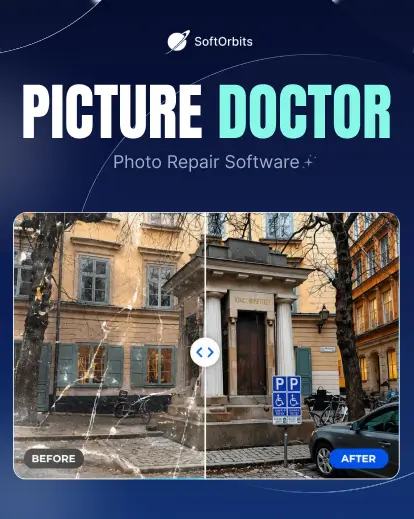



Restore Unreadable Photos and Photoshop Files in Just a Few Clicks
Recover damaged JPEG and PSD files caused by crashes, bad sectors, transfer errors, viruses, or storage failures.


Lost access to important photos due to corruption, crashes, or storage failures? Picture Doctor is a powerful corrupted photo recovery software designed to recover corrupted photos, repair damaged image files, and restore inaccessible JPEG and PSD documents.
Whether you need to repair corrupted JPEG files, perform Photoshop file recovery, or recover years of valuable memories, Picture Doctor provides a simple and reliable solution.
It also restores corrupted images while preserving original quality and Photoshop layers.
With automated batch processing and a user-friendly interface, it’s the ideal photo repair tool for reliably restoring corrupted photos.
See How This Photo Repair Tool Restores Damaged and Unreadable Image Files
Key Features: Everything You Need in a Picture Restoration Software
• Repair corrupted JPEG files
• Restore damaged PSD files
• Preserve Photoshop layers
• Advanced JPEG repair algorithms
• One-click automated recovery
• Lightweight and fast performance
• Restore original image parameters
• Batch repair multiple photos
• View bad sector information
• Check technical file details
• Choose a custom save location
• Fix photos damaged by crashes and viruses
• Recover original colors and dimensions
• Save repaired files in BMP format
System Requirements
• Windows 11/10/8.1/8/7 (32/64 bit)
• Intel i3, AMD Ryzen 5 or above
• 4 GB of RAM or above
• 1280 × 768 screen resolution, 32-bit color
• 1 GB of free hard disk space or above
• Compatible NVIDIA, Intel, and AMD graphics cards
• Supported formats: JPEG (EXIF, JFIF)
• PSD (Adobe Photoshop 3, 4, 5, 6, 7, CS-CS6, CC, 22, 23, 24, 25, 26)
Who Can Benefit from This Photo Repair Software?
• Photographers restoring damaged client photos
• Graphic designers recovering corrupted PSD files
• Families restoring old and treasured photos
• Businesses recovering important image assets
• Digital artists repairing creative projects
• Anyone needing a reliable photo repair tool
Common Corrupted Photo Problems This Photo Repair Software Can Fix
• Corrupted photos that won't open
• Damaged JPEG files
• Unreadable PSD files
• Photos lost after system crashes
• File transfer corruption
• Bad sector image damage
• Virus-damaged photos
• Incomplete JPEG files
• Unsupported file format errors
• Inaccessible photo files
How It Works: Repair Images in 3 Simple Steps
1. Add Your Damaged Photos

2. Start the Recovery Process

3. Save and Access Repaired Images

Benefits of Using This Corrupted Photo Recovery Software
Whether you’re recovering client projects, creative work, or treasured family photos, Picture Doctor helps you restore valuable image files without the hassle of complex recovery methods.
- Recover important client deliverables
- Restore Photoshop projects faster
- Save valuable family memories
- Avoid expensive recovery services
- Reduce the risk of permanent photo loss
- Save time on photo recovery
- Protect creative and business assets
- Recover damaged files with confidence


Frequently Asked Questions
Can it restore damaged old photos that have scratches, spots, etc?
No. This tool only recovers damaged JPEG and PSD file structures.
Can all kinds of JPEG files be repaired using the program?
Unfortunately, Picture Doctor does not fix all kinds of defects, but half of the photos usually turn out to be viewable. It is dependent upon the number of bad sectors in the file. It is also important to take into account the format of the uploaded image/s. The program supports PSD and JPEG. Therefore, you should initially convert it to JPEG if the file is already saved in PNG, GIF, JPG or under any other format.
Will my original files be modified during recovery?
No. The software creates repaired copies of your damaged files, helping preserve the original files for additional recovery attempts if needed.
Can it recover Photoshop PSD files with layers?
Yes. Picture Doctor can recover corrupted PSD files and restore Photoshop projects while preserving their original layer structure.
Is Picture Doctor easy to use for beginners?
Absolutely. The software features a simple interface and automated recovery process, making corrupted photo repair accessible to both beginners and professionals.
Does it work after a system crash or storage failure?
Yes. Picture Doctor is designed to repair damaged photos caused by unexpected shutdowns, system crashes, hard drive issues, and faulty storage media
Can I repair multiple damaged photos at once?
Yes. The software supports batch processing, allowing you to recover multiple corrupted photos in a single operation.
What is the difference between photo repair and photo recovery?
Repair and recovery solve two different problems. Repair fixes a file you still have that will not open, and this image repair tool is built for exactly that. Recovery is for files that were deleted, or wiped when a card got formatted. So if the picture still sits on the disk and shows an error like 'file is not an image', repair it here. If it was erased, run recovery software first, then repair whatever comes back broken.
What image formats does Picture Doctor support?
Picture Doctor supports JPEG (EXIF, JFIF) and Adobe Photoshop PSD files.


Reviews
There are no reviews yet.