
New Retouching Techniques With Photoshop & AI

Video Thumbnail

2h 27m

Duration

13

Video Lessons

Lessons

  • • Introduction
  • • Editing Images With AI In Photoshop
  • • Editing The Background In Photoshop
  • • Unifying The Images Manual Mode V/S AI - Part 1
  • • Unifying The Images Manual Mode V/S AI - Part 2
  • • Changing The Background With AI - Nano-Banana
  • • Replacing The Objects With Nano-Banana On Higgsfield
  • • Outfit Fill With Nano-Banana
  • • Storyboard Function - Higgsfield Pop-corn
  • • Multiple Angles With Higgsfield
  • • Pose Reference With Higgsfield
  • • Edit With Inpaint On Higgsfield / Nano-Banana
  • • Product Placement On Higgsfield / Nano-Banana
Show all Lessons

Quick Summary

  • Learn AI-powered photo editing in Photoshop
  • Edit, replace, and unify backgrounds
  • Compare manual retouching vs AI workflows
  • Replace objects, outfits, and scenes using Nano-Banana
  • Use Higgsfield for storyboards, poses, and multiple angles
  • Refine edits with inpainting tools
  • Add seamless AI-driven product placements
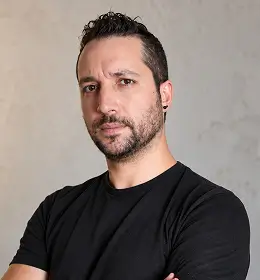
Luca Storelli

ABOUT INSTRUCTOR

Luca Storelli

Luca Storelli is a photographer who lives in Rome and focuses on capturing images in the realms of Fashion, Fine Art, Surrealism, and Portraits.

View Instructor's Classes

Master the Secret to Photographs That Truly Speak

Modern photographers, designers, and digital artists face a growing gap between creative vision and technical limitations.

New Retouching Techniques With Photoshop & Artificial Intelligence is an advanced post-production masterclass that teaches a hybrid workflow.

It combines professional Photoshop techniques with cutting-edge AI platforms to transform how images are retouched, rebuilt, and imagined.

In this in-depth Photoshop retouching tutorial, Luca Storelli guides you through a new approach to post-production.

In this new aproach, Photoshop and AI platforms like Nano Banana Pro and Seed Dream 4.0 work together to redefine what’s possible.

Why Do You Need This Masterclass?

This course focuses on controlled AI retouching, teaching you when to trust your craft and when to let AI take the lead.

You’ll see how AI-powered in-painting seamlessly reconstructs image elements, how intelligent enhancement boosts details and reduces noise,

  • Learn modern Photoshop + AI workflows

  • Go beyond basic photo retouching

  • Rebuild and expand images creatively

  • Replace objects with realistic lighting

  • Create new environments and poses

  • Enhance details and reduce noise

  • Generate multiple image variations

  • Save time with smarter post-production

  • Stay future-ready with AI skills

Who Is This Masterclass For?

  • Photographers and retouchers
  • Product & commercial creatives
  • Digital artists and designers
  • Intermediate Photoshop users
  • AI-curious creatives
  • Post-production professionals
  • Anyone wanting creative freedom
  • Creators who want faster workflows

Future-Ready Photoshop Retouching With AI

Original Studio Photograph

Change Backgrounds Using AI

Remove Objects Using Nano-Banana

Replace Objects Using Nano-Banana

Frequently Asked Questions

AI retouching in Photoshop combines traditional editing techniques with artificial intelligence to enhance, rebuild, and expand images. Instead of only correcting photos, AI helps generate missing details, replace objects, improve image quality, and create realistic variations while Photoshop ensures full creative control and precision.

This masterclass is best suited for intermediate Photoshop users. You should be familiar with basic tools like layers, masks, and selections. The course focuses on advanced retouching workflows and AI integration rather than Photoshop basics.

The masterclass uses Nano Banana Pro and Seed Dream 4.0 alongside Adobe Photoshop. These AI tools help with in-painting, object replacement, image enhancement, noise reduction, and generating creative variations.

No. This course teaches that AI should support, not replace, manual retouching. Photoshop remains essential for control, realism, and artistic intent, while AI speeds up complex tasks and opens creative possibilities.

Yes. You’ll learn how to replace objects and products while maintaining consistent lighting, shadows, textures, and materials ensuring realistic and professional results suitable for commercial use.

Most courses focus only on correction. This masterclass teaches creative expansion, combining Photoshop precision with AI generation to go beyond the limits of the original image.

Yes. This masterclass is built around a hybrid workflow that combines professional manual Photoshop techniques with advanced AI-powered tools. You’ll learn when to rely on traditional retouching skills and when to use AI for faster, smarter edits, giving you full creative control without sacrificing quality.

The course covers modern, professional skin retouching approaches, focusing on realistic results rather than over-smoothing. You’ll learn how to enhance skin texture, refine details, reduce imperfections, and maintain natural tones using both classic Photoshop methods and AI-assisted refinement techniques.

Instead of relying on one-click actions, this course teaches controlled, flexible skin smoothing workflows. You’ll understand how to manually refine skin and then enhance or speed up the process using AI tools resulting in natural, high-end retouching that actions alone can’t achieve.

Unlike traditional courses that focus only on manual tools or basic AI tricks, this masterclass introduces a future-ready Photoshop & AI workflow. It goes beyond skin retouching to include object replacement, background rebuilding, realistic lighting integration, and creative scene expansion.

A New Language of Photo Retouching!

Ratings and Reviews

There are no reviews yet.

0 Ratings & 0 Reviews

Other masterclasses you might like

Unlock your fullest potential in any field with invaluable coaching from the world’s best