

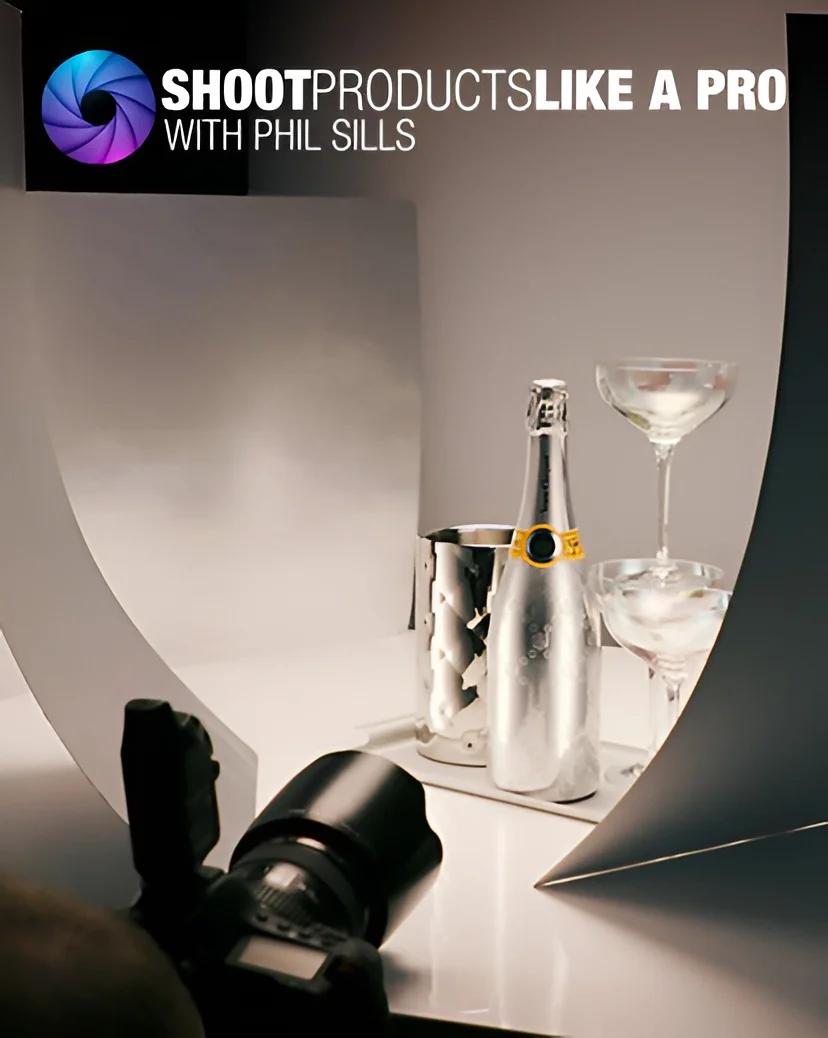



Master Professional Product Photography From The Ground Up
Stop guessing your lighting setups and start creating professional product images with confidence.
This product photography course breaks down the real techniques behind commercial photography in a simple, practical way.
You’ll learn how to control lighting, photograph difficult surfaces, and build stronger setups without relying on expensive gear.
By the end, you’ll have the confidence to create high-quality product images for ecommerce, brands, or clients.

Here’s What Your Product Photography Could Look Like


Everything Covered In This Product Photography Course
Module 1: Introduction
Begin with a foundational overview of the course and the key principles behind professional product images.
Module 2: Space & Mindset
Understand how the approach to your day and shooting has a major positive impact on your results.
Module 3: Setup And Kit
Learn different types of lights, camera types, computers, capture software and backups.
Module 4: Good Quality Digital Files
Learn how to create and edit files that will do your work justice.
Module 5: Framing, Lens & Focus
Learn how to control, minimise or maximise product shape distortion.
Module 6: Hard and Soft Light
Understand the difference between soft and hard lighting, why it’s important, and how to create it.
Module 7: Direct, Bounced and Fill Light
Understand the core principles behind direct, bounced, and fill lighting.
Module 8: Using a Light Tent
Construct a light tent shot with a focus on how to achieve a professional result
Module 9: Glossy and Matt Products
Apply hard and soft lighting techniques to develop simple and effective approaches for glossy and matt object photography
Module 10: Metallic and Transparent Products
Improve your results when shooting metallic and transparent materials
Module 11: Cut-outs and White Backgrounds
Learn how to shoot for cut-out, and against white and black backgrounds
Module 12: Surfaces: Shadow & Reflection
Explore how to integrate a product onto a surface using a shadow or a reflection.
Module 13: Our Champagne Celebration
Be confident & know everything you need to conduct a professional shoot in front of a client
Sneak Peak Inside The Product Photography Training


What’s Included In This Online Product Photography Course
-40+ quick videos across 13 modules
-3+ hours of content
-Product photoshoot setup diagrams
Real Product Photography Lessons in Action
Don’t Just Take Our Word For It…
“If you’re thinking about starting out in a new career as a product photographer, this is the right course for you!”
Elisabetta VacchettoFreelance Photographer
“This online product photography course made me consider the work I do every day on set in a new way.”
Mike GibsonPhotographic Assistant
“I couldn’t ask for a better teacher on product photography, as you have such valuable experience in this sphere, and you managed to transfer a lot of your knowledge into this course.”
Nikolaj VlasovNew Photographer
Build The Confidence To Shoot Any Product
Great product photography is not about expensive gear. It’s about understanding light, control, and creative decision-making.
This product photography course helps you build those skills step by step.
Learn how to handle reflections, shape light, photograph difficult surfaces, and create clean, commercial-quality images with confidence.
By the end, you’ll know how to approach product shoots with a professional mindset and create polished visuals.

Frequently Asked Questions
Do I need expensive gear to take this course?
No. One of the core lessons in the course is that great product photography is about understanding light, not owning expensive equipment. You can start with a basic setup and still achieve professional-looking results.
Does the course teach product photography lighting techniques?
Absolutely. Lighting is a major focus of the course. You’ll learn hard light, soft light, direct light, bounced light, fill light, diffusers, reflections, and practical ways to light different types of products professionally.
Will I learn how to photograph difficult products like glass and metal?
Yes. The course includes dedicated modules on glossy, metallic, and transparent products. You’ll learn how to control reflections, shape highlights, and create clean, polished images for even the most challenging surfaces.
Does the course include Photoshop and editing lessons?
Yes. You’ll learn how to improve your digital files using Photoshop techniques like Levels, Curves, sharpening, exposure adjustments, and file optimization for cleaner final results.
Will this course help improve my product photoshoot setup?
Definitely. The training covers studio setup, lighting arrangements, set diagrams, workflow organization, capture software, and practical approaches to building an efficient product photography setup.
Can I follow the product photography lessons at my own pace?
Yes. Since this is an online product photography course, you can watch the lessons anytime and learn at your own pace from anywhere.
What kind of results can I expect after completing the course?
By the end of the course, you’ll have a much stronger understanding of product photography lighting, reflections, surfaces, composition, and workflow. You’ll be able to create cleaner, sharper, more professional product images with greater confidence.
Will I learn how to shoot products on white backgrounds?
Yes. The course covers white background photography, cut-outs, shadow control, reflections, and techniques for creating clean ecommerce-ready product images.
What types of products will I learn to photograph?
You’ll learn techniques for photographing glossy products, matte surfaces, metallic objects, transparent products, reflective materials, and more.
What makes this one of the best product photography courses for beginners?
The course simplifies complex lighting and shooting concepts into practical lessons that are easy to understand and apply immediately.


Reviews
There are no reviews yet.