


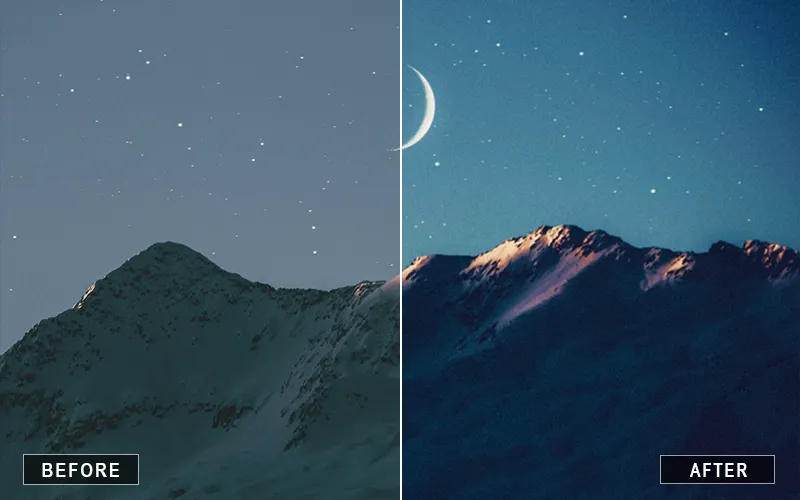
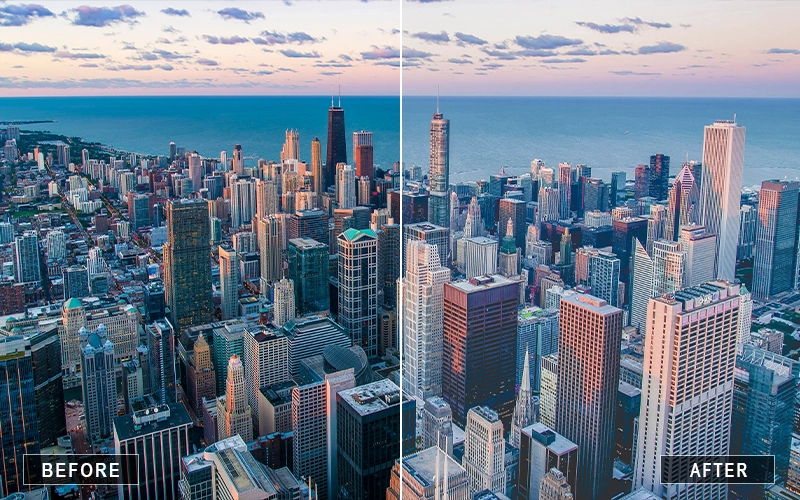

What's Included
Lightroom Presets - Vol 1
1008 Animals Lightroom presets
• 760 Black and White Lightroom Presets
• 487 Blogger Lightroom Presets
• 400 Change The Color Lightroom Presets
• 1000 Children Lightroom Presets
• 859 City Lightroom Presets
• 439 Couples Lightroom Presets
• 1000 Dark Lightroom Presets
• 887 Film Lightroom Presets
• 287 Food Lightroom Presets
• 689 Freedom Lightroom Presets
• 537 Indoor Lightroom Presets
• 498 Instagram Lightroom Presets
• 984 Landscape Lightroom Presets
Lightroom Presets - Vol 2
• 698 Matte Lightroom Presets
• 400 Natural Touch Lightroom Presets
• 970 Newborn Lightroom Presets
• 700 Night Lightroom Presets
• 436 Pastel Lightroom Presets
• 1002 Portrait Lightroom Presets
• 640 Shooter Lightroom Presets
• 915 Sport Lightroom Presets
• 903 Studio Lightroom Presets
• 1002 Sunset Lightroom Presets
• 947 Urban Lightroom Presets
• 865 Vintage Lightroom Presets
• 985 Wedding Lightroom Presets
Every Photo. Every Style. One Massive Collection.
Never search for the perfect preset again. It’s already here.
- 20,000+ Total LR Presets
- .XMP & .lrtemplate Files
- Works With All Types Of Desktop Lightroom
- Works with Windows & Mac
Watch Ordinary Photos Come Alive
About this product
Editing shouldn’t feel like starting from scratch every time you import a new gallery. Whether you’re chasing golden sunsets, cinematic city lights, timeless black & white portraits, or vibrant wedding moments, this collection gives you a starting point that feels inspiring instead of overwhelming. With 20,000+ Lightroom presets across 27 carefully organized categories, you’ll always have a style that matches your vision.
Compatible with all desktop versions of Lightroom, the bundle includes both .XMP and .lrtemplate preset formats, along with usage instructions for quick setup. From portraits and landscapes to newborns, sports, food, weddings, and night photography, this collection helps you create consistent edits while saving hours of manual adjustments. Plus, the included Extended Commercial License lets you confidently use your edits for client work.
Key Highlights
- 20,000+ Lightroom Presets
- 27 editing categories
- Works with all desktop Lightroom versions
- Includes .XMP & .lrtemplate files
- Windows & Mac compatible
- Extended Commercial License included
- Usage instructions included
- Instant download
Works With

Lightroom CC
licensing
Extended Commercial License:
Unlimited use for personal projects
Unlimited use for client photography projects
Sell prints, photo books, and digital downloads
Use in social media, websites, and marketing
Do not resell the original preset files
Do not share or distribute the original files
Audience
This Photoshop Editing Bundle is perfect for:
- Portrait photographers
- Wedding photographers
- Landscape photographers
- Travel & street photographers
- Lightroom creators & enthusiasts
- Content creators and social media photographers
Frequently Asked Questions
Yes. Presets are fully customizable. After applying one, you can tweak exposure, contrast, temperature, or any other setting to match your photo perfectly.or incididunt ut labore et dolore magna aliqua.
You’ll get instant access via download right after purchase. Simply download, install, and start editing.
Yes, absolutely. This bundle comes with an extended commercial license, which means you can confidently use the presets for paid client projects, professional shoots, social media content, and commercial assignments. You’re free to apply them to your work and deliver polished, professional results to your clients without any additional licensing fees.
After downloading the bundle, you’ll find clear step-by-step installation instructions included. The process is simple and takes only a few minutes inside Lightroom.
Yes. This is a one-time purchase with lifetime access to the downloaded files.
Lightroom presets cannot be directly used inside Photoshop. However, you can apply the preset in Lightroom first and then open the edited image in Photoshop for further adjustments if needed.
Yes, Lightroom presets can save a lot of time and help you achieve professional-looking edits quickly. They provide a strong starting point for your edits and help maintain a consistent style across your photos.
Lightroom allows you to apply a preset to multiple photos at once using the Sync feature. Simply edit one photo with a preset, select the other photos, and click Sync to apply the same settings to all selected images.
Yes, you can apply multiple presets to the same image. Each preset adjusts different settings, and you can tweak them manually afterward to create a custom look that fits your photo perfectly.
Lightroom presets can be shared by exporting the preset files (.XMP or .lrtemplate). You can send these files to others, and they can import them directly into their Lightroom software.
The exact location may vary depending on your operating system and Lightroom version, but you can access it from the Preferences > Presets section in Lightroom.
To transfer presets, simply copy the preset files from your current Lightroom preset folder and move them to the new computer. After that, import them into Lightroom to start using them.
Reviews
There are no reviews yet.