Master Wildlife Photo Editing In Photoshop
Photography Masterclasses

Master Wildlife Photo Editing In Photoshop

Transform your wildlife shots into dramatic, cinematic images with this step-by-step wildlife photo editing masterclass.
1 hour
2 Lessons
No Materials

Access ALL masterclasses with PhotoWhoa PLUS

What You'll Be Able To Create

Turn ordinary wildlife shots into bold, cinematic images with professional editing techniques

Dramatic Wildlife Portraits

Create powerful visuals using advanced wildlife photo editing techniques

Light-Focused Visual Storytelling

Control light and mood while editing wildlife photos in photoshop

Portfolio-Worthy Final Images

Follow a complete system for how to edit animal photos professionally

See What You’ll Learn to Create​

This wildlife photo editing masterclass shows you how to create images that stand out instantly from flat RAW images to cinematic masterpieces.
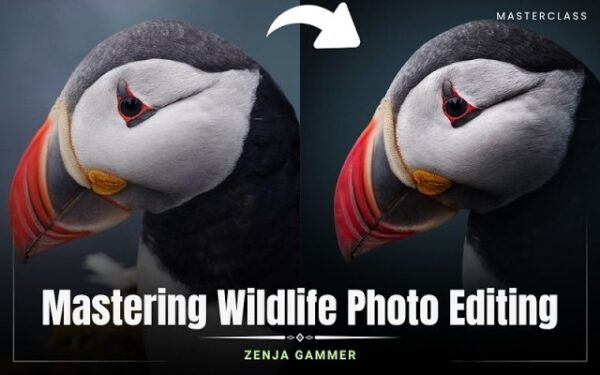
Before and after comparison demonstrating editing wildlife photos in Photoshop for stronger contrast and detail
Dramatic lion portrait showing advanced wildlife photo editing with enhanced depth and cinematic lighting
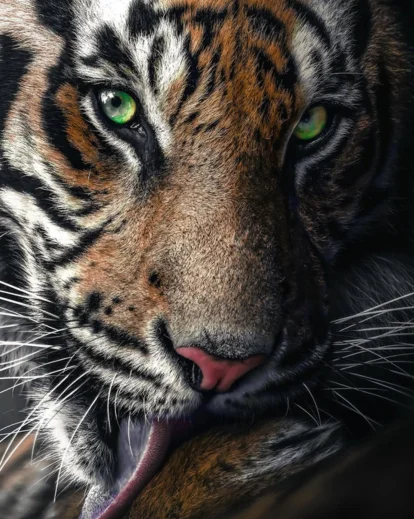
Cinematic wildlife image created using professional wildlife photo editing techniques
Moody animal portrait created through advanced wildlife photo editing and color grading
Bird image with enhanced feather detail using precise bird photography editing techniques
Wildlife photo transformed using step-by-step editing wildlife photos workflow

What This Wildlife Photo Editing Masterclass Is All About

Wildlife photography doesn’t end when you click the shutter, it truly comes alive in the editing process. In this wildlife photo editing masterclass, you’ll learn how to transform ordinary images into dramatic, high-impact visuals using Photoshop.

You’ll discover:

  • How to approach editing wildlife photos with a cinematic mindset
  • How to use light shaping techniques for powerful lion photo editing
  • How to refine tones and colors while editing wildlife photos in photoshop

This course focuses on real-world workflows using actual photographs.

If you want your wildlife images to feel bold, emotional, and professional, mastering how to edit wildlife photos is essential.

What You’ll Learn In This Wildlife Photo Editing Masterclass

Learn how to edit, enhance, and transform wildlife images step-by-step
Wildlife image with improved lighting using editing wildlife photos in Photoshop techniques
Complete wildlife photo editing workflow from start to finish
Professional techniques for editing wildlife photos in photoshop
How to use dodge and burn for realistic light shaping
Step-by-step lion photo editing for dramatic results
Advanced bird photography editing techniques for feather detail
Using Curves, Color Balance, and Color Lookup effectively
Global adjustments using Camera Raw for final polish
A repeatable system for how to edit animal photos professionally

Lessons Breakdown

focused lessons designed for practical application. Each lesson builds on the previous, taking you from fundamentals to advanced techniques.

lesson 1

Master Wildlife Photo Editing In Photoshop – Lesson 1

37m 0s
lesson 2

Master Wildlife Photo Editing In Photoshop – Lesson 2

21m 0s

Who Is This Wildlife Photo Editing Masterclass For?

  • Wildlife Photographers — Improve your wildlife photo editing workflow
  • Bird Photographers — Master bird photography editing for sharper, cleaner images
  • Photoshop Users — Learn editing wildlife photos in photoshop step-by-step
  • Photo Editors — Build a consistent system for editing wildlife photos
  • Creators & Artists — Learn how to edit animal photos for dramatic results
  • Professionals — Create high-end visuals with advanced lion photo editing techniques
Zenja Gammer
Expert Instructor

Zenja Gammer

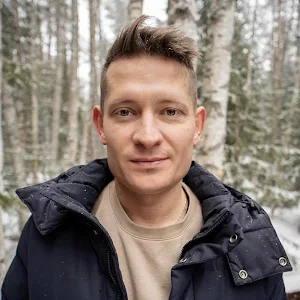
With 20+ years of Photoshop experience, Zenja Gammer helps photographers turn ideas into striking digital art. A visual design graduate from Amsterdam, he has trained 5,000+ students and built a 90K+ Instagram following through his wildlife-inspired creations. Through his teaching, Zenja focuses on simplifying complex techniques, so you can create faster, better, and with more confidence.

View instructor’s classes

Frequently Asked Questions

To start with wildlife photo editing, you need to focus on exposure correction, contrast, and subject enhancement. In this masterclass, you’ll learn a complete step-by-step workflow for editing wildlife photos in Photoshop, from basic adjustments to advanced cinematic edits.

Professional editing wildlife photos involves techniques like dodge and burn, color grading, masking, and detail enhancement. This course teaches you how to combine these techniques to create dramatic, high-impact wildlife images.

The best workflow for editing wildlife photos in Photoshop includes base adjustments, contrast shaping, subject enhancement, color grading, and final polishing. This masterclass provides a complete, repeatable workflow used on real wildlife images.

Enhancing details is key in wildlife photo editing. You’ll learn how to sharpen textures, improve clarity, and bring out fine details in fur and feathers without over-processing your images.

Yes, this wildlife photo editing masterclass is beginner-friendly while also covering advanced techniques. You’ll learn both the fundamentals and professional workflows for editing wildlife photos.

This course covers essential tools for editing wildlife photos in Photoshop, including Curves, Color Balance, Camera Raw, masking, and dodge & burn techniques for precise control.

Color grading is crucial in wildlife photo editing. You’ll learn how to use Color Balance, Curves, and Color Lookup to create mood, enhance tones, and make your images visually striking.

Absolutely. The techniques taught in this wildlife photo editing masterclass are designed for real-world use, helping you create portfolio-ready images and professional-level edits.

With a structured workflow like the one in this wildlife photo editing course, you can start seeing improvements quickly. Mastery comes with practice, and this course gives you a clear path to follow.

Dodge and burn is a technique used in editing wildlife photos to control light and shadow. In this course, you’ll learn how to use it effectively to highlight your subject and create depth without making the image look artificial.

Get PhotoWhoa PLUS

Unlock this masterclass and 70+ more for one low annual price

What's included:

$99

/year

Price locked once you subscribe. Cancel anytime.

Get instant access to ALL masterclasses with PhotoWhoa PLUS

In-Depth Classes
1 +
Hours of Practical Training
1 +
Expert Instructors
1 +

Join photographers worldwide improving their skills with PhotoWhoa PLUS

Become a PhotoWhoa Charter Plus Member

Access With Plus


