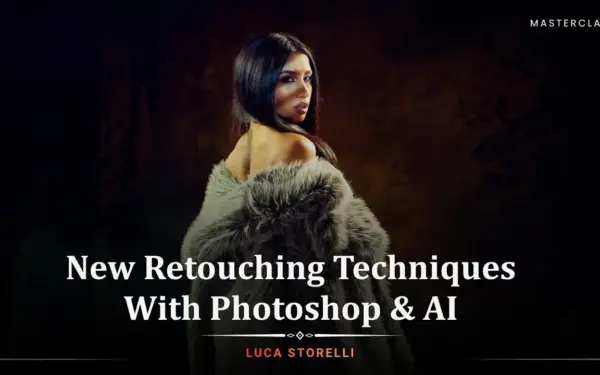
New Retouching Techniques With Photoshop & AI
Photography Masterclasses

New Retouching Techniques With Photoshop & AI

Master professional Photoshop skin retouch, AI-powered background replacement, and creative image rebuilding — all in one advanced retouch course.
2.5 hours
13 Lessons

Access ALL masterclasses with PhotoWhoa PLUS

What You'll Be Able To Create

A hybrid Photoshop and AI workflow that lets you correct, expand, and transform images in ways that weren’t possible before.

Flawlessly Retouched Portraits

You'll be able to retouch skin, remove imperfections, and smooth tones using frequency separation and professional Photoshop skin retouch techniques.

Completely Transformed Backgrounds & Scenes

You'll be able to replace, extend, and rebuild image backgrounds using AI-powered inpainting and generative fill — with realistic lighting and seamless edges every time.

Creative AI-Generated Image Variations

You'll be able to generate new poses, replace objects and outfits, add product placements, and produce multiple image variations from a single original shot.

See What You'll Learn To Create

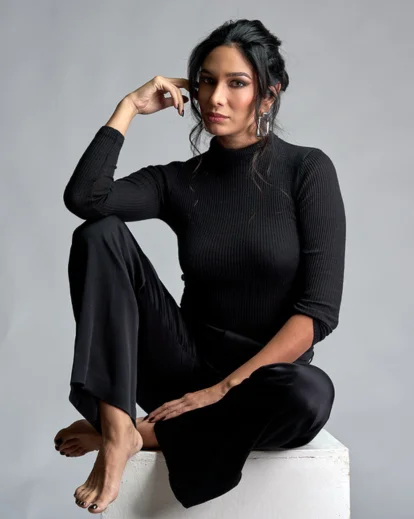
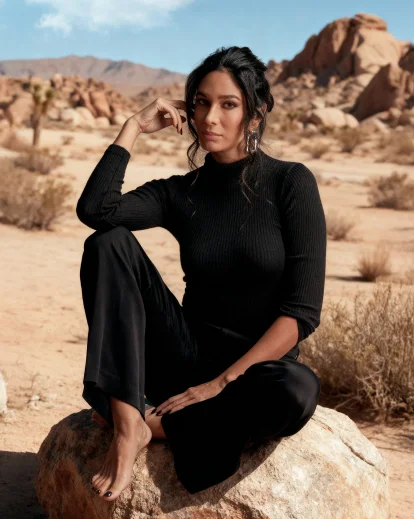
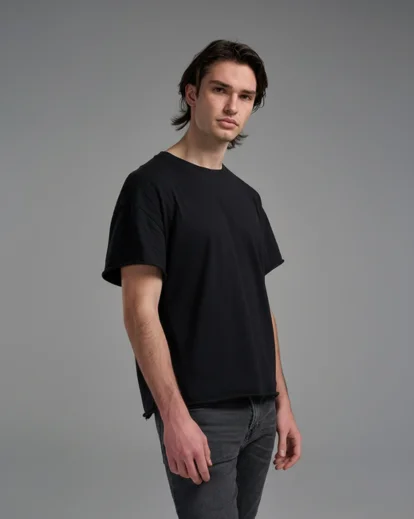
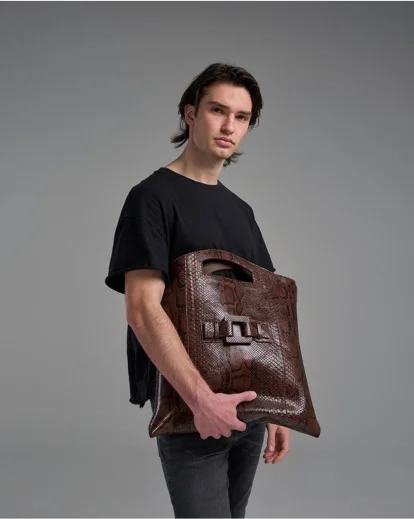
Real before and after examples from the masterclass showing how Photoshop retouching techniques and AI tools work together to transform images.
AI retouching replacing background in portrait seamlessly
Portrait retouching tutorial showing background change in Photoshop
Retouching techniques with Photoshop for object removal and replacement
Retouching techniques with Photoshop removing unwanted objects

What This Photoshop Retouching Tutorial Is About

Most retouching workflows were built for a world where Photoshop was the only tool available. Today, AI platforms have changed what’s possible — but most photographers don’t know how to combine them with professional manual techniques into a fast, reliable workflow. In this masterclass, you’ll learn how to:
  • Master frequency separation and professional skin smoothing in Photoshop for clean, natural-looking skin retouch without destroying texture
  • Replace, extend, and rebuild image backgrounds using AI generative fill and inpainting tools that respect lighting and edge detail
  • Use Nano Banana Pro to swap objects, outfits, and scenes while keeping the original subject and lighting intact
  • Generate storyboards, new poses, and multiple image variations using Seed Dream 4.0 and AI-driven creative tools
  • Add seamless product placements and create composite scenes that look like they were shot that way from the start
You won’t just learn new tools — you’ll build a complete hybrid workflow that makes you faster, more flexible, and genuinely future-ready as a retoucher.

What You'll Learn In This High End Beauty Retouching Tutorial

Professional Photoshop manual techniques and cutting-edge AI workflows — from skin retouching to full image rebuilds.
Portrait retouching tutorial showing before and after skin edit
How to use frequency separation for high end beauty retouching
How to use the healing brush and Infinite Retouch panel in Photoshop to remove wrinkles, stray hairs, and skin imperfections quickly and non-destructively.
How to apply curves, Camera Raw adjustments, and tonal corrections to build a cinematic, professional base before retouching begins.
How to use AI generative fill and inpainting in Photoshop to extend backgrounds, fill in missing areas, and rebuild image elements seamlessly.
How to use Nano Banana Pro to replace backgrounds, swap objects and outfits, and generate new scenes while keeping the subject, lighting, and materials consistent.
How to use Seed Dream 4.0 to create image variations, generate new poses, build storyboards, and explore creative directions from a single original image.
Add AI-driven product placements that integrate naturally into the existing composition and lighting of an image
When to rely on manual Photoshop techniques versus when to let AI tools take the lead

Lessons Breakdown

focused lessons designed for practical application. Each lesson builds on the previous, taking you from fundamentals to advanced techniques.

lesson 1

New Retouching Techniques With Photoshop & AI: Lesson 1

3m 1s
lesson 2

New Retouching Techniques With Photoshop & AI: Lesson 2

26m 12s
lesson 3

New Retouching Techniques With Photoshop & AI: Lesson 3

22m 23s
lesson 4

New Retouching Techniques With Photoshop & AI: Lesson 4

11m 50s
lesson 5

New Retouching Techniques With Photoshop & AI: Lesson 5

12m 31s
lesson 6

New Retouching Techniques With Photoshop & AI: Lesson 6

10m 19s
lesson 7

New Retouching Techniques With Photoshop & AI: Lesson 7

13m 4s
lesson 8

New Retouching Techniques With Photoshop & AI: Lesson 8

11m 4s
lesson 9

New Retouching Techniques With Photoshop & AI: Lesson 9

8m 51s
lesson 10

New Retouching Techniques With Photoshop & AI: Lesson 10

3m 33s
lesson 11

New Retouching Techniques With Photoshop & AI: Lesson 11

12m 3s
lesson 12

New Retouching Techniques With Photoshop & AI: Lesson 12

10m 22s
lesson 13

New Retouching Techniques With Photoshop & AI: Lesson 13

4m 59s

Continue Your Learning Journey With Guided Path

This masterclass is part of the Photo Retouching & Editing Learning Path — a step-by-step learning journey designed to help photographers master Photoshop retouching, improve editing precision, and create cleaner, more polished images.

Foundations

Core Techniques

Creative Mastery

Advanced Workflows

Strengthen your retouching skills and learn how to create cleaner, more professional photo edits.

Who Is This Photoshop Retouching Tutorial For?

  • Portrait & Fashion Photographers — Add professional skin retouching, background replacement, and AI-powered creative tools to your post-production workflow without slowing down.
  • Product & Commercial Photographers — Use AI to seamlessly swap backgrounds, add product placements, and generate scene variations — all while keeping lighting and materials looking real.
  • Intermediate Photoshop Users Ready to Go Further — You already know the basics. This retouch course shows you how to combine what you know with AI tools for faster, more powerful results.
  • Digital Artists & Post-Production Professionals — Stay ahead of the curve by mastering the hybrid Photoshop and AI workflow that is quickly becoming the new industry standard.
Luca Storelli

Expert Instructor

Luca Storelli

Luca Storelli is an internationally published fine art and fashion photographer, expert retoucher, and educator based in Rome. His work has been feated in renowned publications such as 7Hues, Solis Magazine, Style Cruze, 365 ART + Japan, Dark Beauty, Moevir Paris, Feroce, Elegant, and Assure’ Magazine. Specializing in fashion, fine art, and portrait photography, Luca has built a strong reputation for creating visually compelling imagery. His expertise spans across fashion lookbooks, brand identity, commercial wedding photography, editorial work, and high-end advertising campaigns.

View instructor’s classes

Frequently Asked Questions

AI retouching in Photoshop combines traditional editing techniques with artificial intelligence to enhance, rebuild, and expand images. Instead of only correcting photos, AI helps generate missing details, replace objects, improve image quality, and create realistic variations while Photoshop ensures full creative control and precision.

This masterclass is best suited for intermediate Photoshop users. You should be familiar with basic tools like layers, masks, and selections. The course focuses on advanced retouching workflows and AI integration rather than Photoshop basics.

The masterclass uses Nano Banana Pro and Seed Dream 4.0 alongside Adobe Photoshop. These AI tools help with in-painting, object replacement, image enhancement, noise reduction, and generating creative variations.

No. This course teaches that AI should support, not replace, manual retouching. Photoshop remains essential for control, realism, and artistic intent, while AI speeds up complex tasks and opens creative possibilities.

Yes. You’ll learn how to replace objects and products while maintaining consistent lighting, shadows, textures, and materials ensuring realistic and professional results suitable for commercial use.

Most courses focus only on correction. This masterclass teaches creative expansion, combining Photoshop precision with AI generation to go beyond the limits of the original image.

Yes. This masterclass is built around a hybrid workflow that combines professional manual Photoshop techniques with advanced AI-powered tools. You’ll learn when to rely on traditional retouching skills and when to use AI for faster, smarter edits, giving you full creative control without sacrificing quality.

The course covers modern, professional skin retouching approaches, focusing on realistic results rather than over-smoothing. You’ll learn how to enhance skin texture, refine details, reduce imperfections, and maintain natural tones using both classic Photoshop methods and AI-assisted refinement techniques.

Instead of relying on one-click actions, this course teaches controlled, flexible skin smoothing workflows. You’ll understand how to manually refine skin and then enhance or speed up the process using AI tools resulting in natural, high-end retouching that actions alone can’t achieve.

Unlike traditional courses that focus only on manual tools or basic AI tricks, this masterclass introduces a future-ready Photoshop & AI workflow. It goes beyond skin retouching to include object replacement, background rebuilding, realistic lighting integration, and creative scene expansion.

Get PhotoWhoa PLUS

Unlock this masterclass and 70+ more for one low annual price

What's included:

$99

/year

Price locked once you subscribe. Cancel anytime.

Get instant access to ALL masterclasses with PhotoWhoa PLUS

In-Depth Classes
1 +
Hours of Practical Training
1 +
Expert Instructors
1 +

Join photographers worldwide improving their skills with PhotoWhoa PLUS

Become a PhotoWhoa Charter Plus Member

Unlock Luca Storelli's
Free AI Workflow Lesson

Learn how photographers create cinematic AI imagery using Midjourney, Magnific AI, and Photoshop.

3-minute lesson • Instant access

No spam. Just world-class photography education.

Access With Plus