Color Grading & Color Correction Course In Photoshop
Photography Masterclasses

Color Grading & Color Correction Course In Photoshop

A complete color grading course that takes you from fixing bad colors and white balance with a real-world workflow.
1.4 hours
16 Lessons
Practice Files

Access ALL masterclasses with PhotoWhoa PLUS

What You'll Be Able To Create

From fixing colors to creating cinematic grades, here’s what you’ll be able to create with this masterclass

Naturally Corrected Photos

Fix color casts, white balance issues, and unnatural skin tones

Cinematic Color Grades

Apply intentional, creative color grades to portraits, wedding photos, and urban scenes

Your Own Presets

Build reusable tools like presets, LUTs, and actions

See The Kind Of Results You'll Get

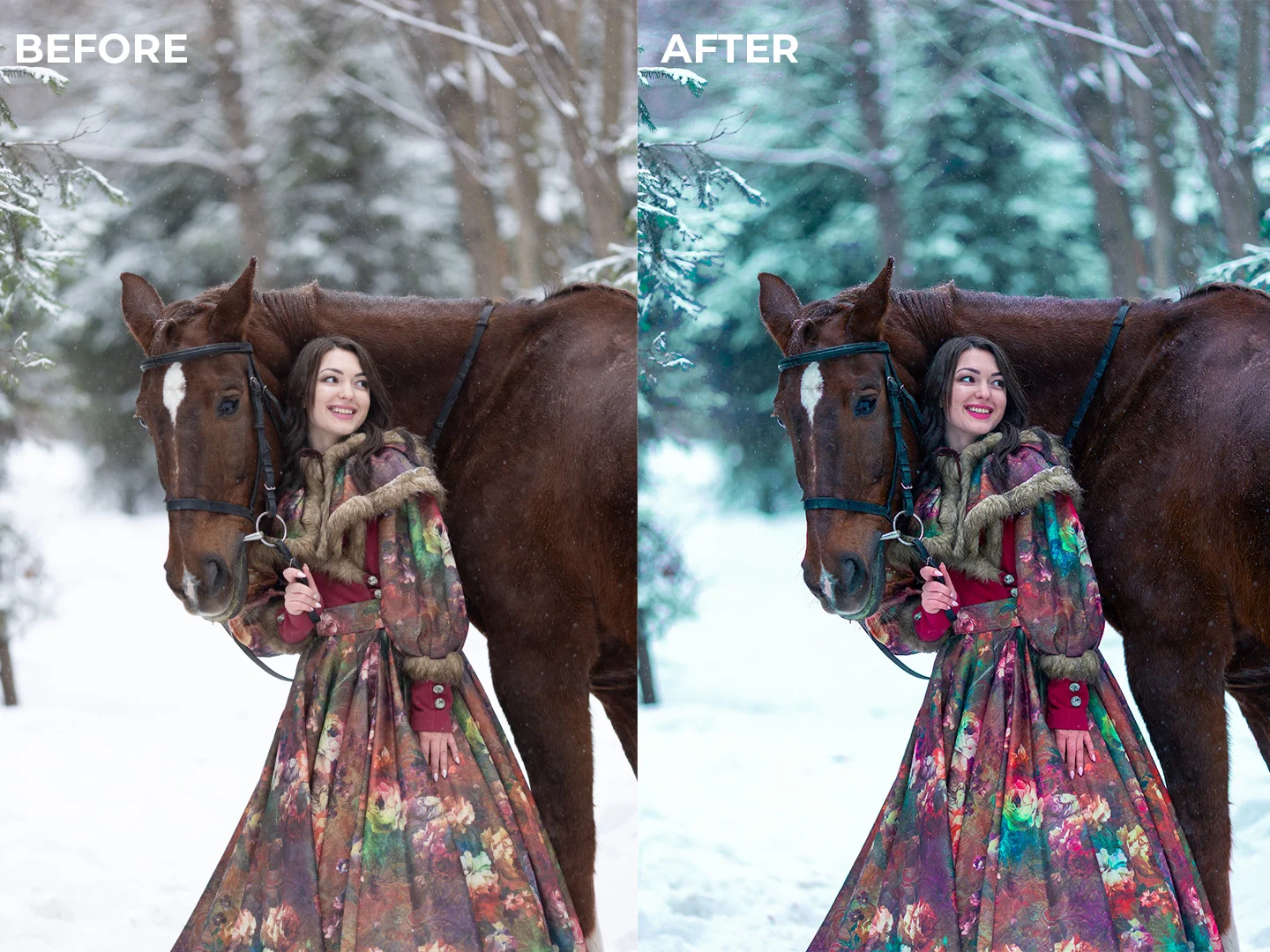
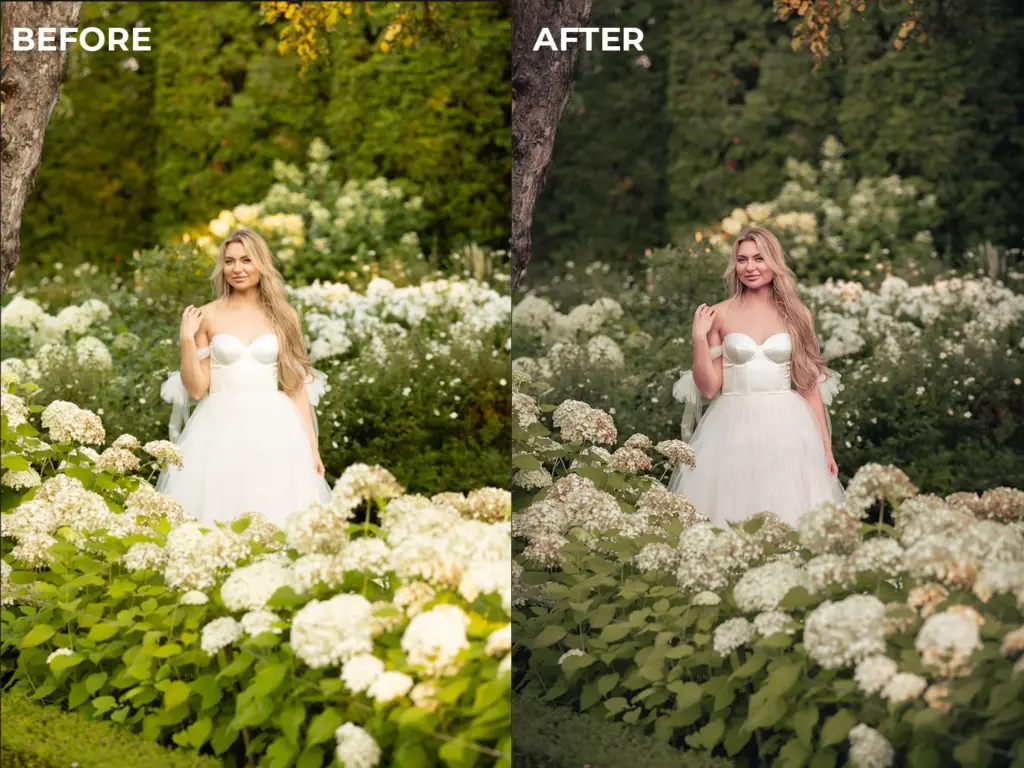
Real examples from the masterclass showing the results of professional color correction and creative color grading in Photoshop.
Professional colour grading course workflow for portrait editing
Masterclass color grading showing dramatic color transformation
Before and after color correcting tutorial in Photoshop
Adjustment layer color grading in Photoshop for consistent results

What This Color Grading Class Is About

You can have great composition, sharp focus, and good lighting, and the image still won’t look professional if the color is off. Strange color casts, unnatural skin tones, and images that don’t match each other in a set are some of the most common issues photographers and editors face, and most tutorials only show you what buttons to click without explaining why.
  • Understand the difference between color correction and color grading, and why getting that order right changes everything
  • Fix white balance, color casts, and inconsistent skin tones using Camera Raw, Adjustment Layers, and AI-assisted tools in Photoshop
  • Apply professional color grading workflows to portraits, wedding photos, and urban photography with real intention behind every decision
  • Learn how professionals build consistent color across a full set of images: not just one photo at a time
  • Create your own presets, LUTs, and Photoshop actions so your color style is repeatable and saves you time on every future edit
You won’t just know how to grade a photo; you’ll understand color deeply enough to make the right call on any image, in any situation.
What You'll Learn In This Color Grading Class

Practical skills you can apply to any image – from your first correction to your final creative grade.
Photoshop color correction course fixing white balance issues
How color correction and color grading actually differ
How to identify and fix common color problems
How to use Photoshop's core color tools correctly, including curves, hue and saturation
How to apply intentional color grades to portraits
How to use AI-assisted tools in Photoshop to speed up your workflow
How to create your own LUTs, presets, and Photoshop actions
How to build a complete professional workflow
How to avoid the most common color grading mistakes

Lesson Breakdown

Focused lessons designed for practical application. Each lesson builds on the previous, taking you from fundamentals to advanced techniques.
lesson 1

Color Grading & Color Correction Course In Photoshop: Lesson 1

3m 48s
lesson 2

Color Grading & Color Correction Course In Photoshop: Lesson 2

4m 56s
lesson 3

Color Grading & Color Correction Course In Photoshop: Lesson 3

1m 34s
lesson 4

Color Grading & Color Correction Course In Photoshop: Lesson 4

3m 5s
lesson 5

Color Grading & Color Correction Course In Photoshop: Lesson 5

6m 50s
lesson 6

Color Grading & Color Correction Course In Photoshop: Lesson 6

5m 32s
lesson 7

Color Grading & Color Correction Course In Photoshop: Lesson 7

5m 0s
lesson 8

Color Grading & Color Correction Course In Photoshop: Lesson 8

5m 59s
lesson 9

Color Grading & Color Correction Course In Photoshop: Lesson 9

12m 21s
lesson 10

Color Grading & Color Correction Course In Photoshop: Lesson 10

7m 22s
lesson 11

Color Grading & Color Correction Course In Photoshop: Lesson 11

5m 57s
lesson 12

Color Grading & Color Correction Course In Photoshop: Lesson 12

4m 32s
lesson 13

Color Grading & Color Correction Course In Photoshop: Lesson 13

4m 29s
lesson 14

Color Grading & Color Correction Course In Photoshop: Lesson 14

5m 10s
lesson 15

Color Grading & Color Correction Course In Photoshop: Lesson 15

6m 36s
lesson 16

Color Grading & Color Correction Course In Photoshop: Lesson 16

2m 11s

Continue Your Learning Journey With Guided Path

This masterclass is part of the Mastering Photoshop Learning Path: a structured journey designed to help photographers and creatives improve their editing workflow and create visually striking images

Foundations

Core Techniques

Creative Mastery

Advanced Workflows

Learn how to create richer colors, cinematic tones, and more visually impactful edits in Photoshop.

Who Is This Color Grading Class For?

  • Beginner Photographers — Learn how to create more polished, professional-looking images with better color.
  • Photoshop Users — Understand color deeply instead of relying on random sliders and presets.
  • Retouchers & Editors — Match colors consistently across images and speed up your workflow.
  • Creatives Building a Style — Create a signature look and turn it into reusable presets, LUTs, and actions.
Mac Moses Michael

Expert Instructor

Mac Moses Michael

Mac Moses Michael is a dedicated, self-taught digital artist with a deep passion for creating art through technology. His work is inspired by portraiture, science fiction, and fantasy, aiming to transport viewers to imaginative new worlds. With years of experience and constant experimentation, Mac has honed his craft to push creative boundaries. Remembering the challenges he faced as a beginner, he now teaches aspiring artists, helping them overcome early struggles and guiding them toward success in their own artistic journeys.

View instructor’s classes

See How Photographers Are Improving

Real feedback from photographers applying these techniques to improve their editing and workflow.

‘This is a quick and relatively easy way of giving your photographs a natural and beautiful look. You must however be careful not to overdo things because too much ruins your art.

Johannes Pordon Johannes Pordon

Frequently Asked Questions

Yes. This course is designed specifically to take beginners from the fundamentals of color correction to advanced color grading techniques. No prior professional Photoshop experience is required — everything is explained step by step.

Color correction focuses on fixing white balance, exposure, and inaccurate colors to make an image look natural. Color grading is the creative process of enhancing colors to create a mood or style. This masterclass teaches both clearly, so you know when and how to use each approach.

Yes. This is a color grading Photoshop course, and all techniques are demonstrated using Adobe Photoshop, including Camera Raw, Adjustment Layers, and AI-based tools.

Yes. One of the core outcomes of this color grading class is learning how to create your own presets, LUTs, filters, and Photoshop actions so you can speed up your workflow and maintain consistency.

This is a color grading online course, allowing you to learn at your own pace. You can pause, rewind, and revisit lessons anytime as you practice.

Definitely. While the course is beginner-friendly, it also covers advanced, real-world workflows used by professionals who want consistency, efficiency, and a signature color style.

The course includes color grading lessons for portraits, wedding photography, and urban photography, making it suitable for a wide range of creative styles.

Yes, this colour grading course is designed for both beginners and professionals who want consistent, high-quality color across their images.

This color correcting tutorial teaches a structured workflow so you can edit faster, maintain consistency, and avoid over-processing your images.

Unlike basic tutorials, this masterclass color grading course focuses on understanding how color works, helping you create consistent and professional results across all your images.

Get PhotoWhoa PLUS

Unlock this masterclass and 70+ more for one low annual price

What's included:

$99

/year

Price locked once you subscribe. Cancel anytime.

Get instant access to ALL masterclasses with PhotoWhoa PLUS

In-Depth Classes
1 +
Hours of Practical Training
1 +
Expert Instructors
1 +

Join photographers worldwide improving their skills with PhotoWhoa PLUS

Become a PhotoWhoa Charter Plus Member

Access With Plus