cart icon0

Black & White Portrait Photography For Wildlife & Humans
Plus Masterclasses

Black & White Portrait Photography For Wildlife & Humans

Learn professional black and white portrait editing techniques to create dramatic, cinematic, and emotionally powerful monochrome images in Photoshop.
1 hour
2 Lessons

Access ALL masterclasses with PhotoWhoa PLUS

What You'll Be Able To Create

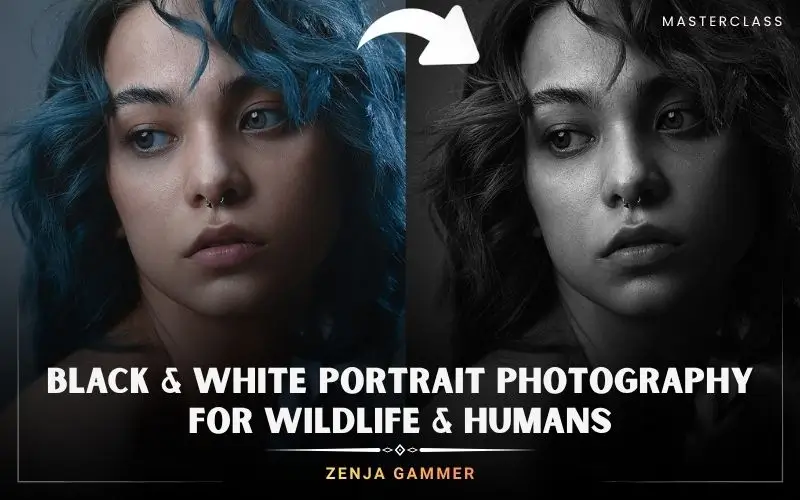
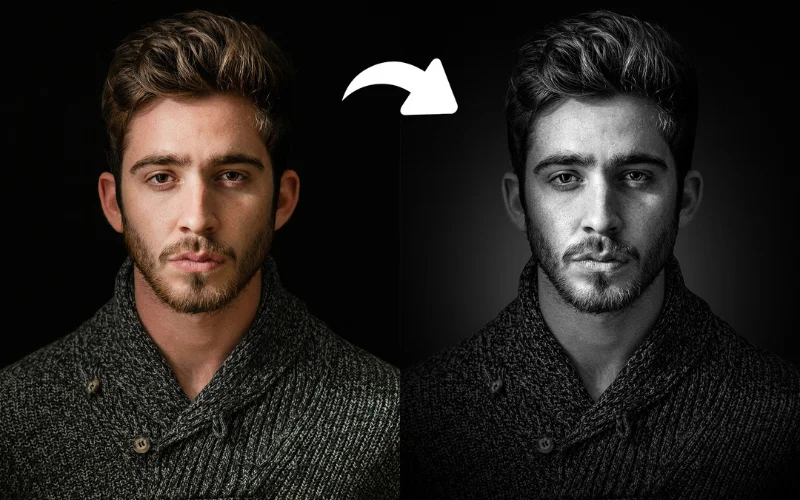
Transform flat portraits into dramatic black and white masterpieces.

Cinematic Monochrome Portraits

Create powerful black and white portrait editing results with dramatic tonal depth

Dramatic Contrast & Atmosphere

Learn the best way to edit black and white photos for cinematic mood

Reusable Editing Workflows

Build repeatable monochrome photo editing presets for future projects

Create Dramatic Black & White Images With Professional Depth

This black and white photo editing in Photoshop masterclass teaches you how to shape light, contrast, and emotion for cinematic portrait results.
Professional black and white portrait editing using dodge and burn
Moody monochrome photo editing with atmospheric glow effects
Advanced black and white photo editing workflow in Photoshop
Creative black and white portrait editing with dramatic eye enhancement

What This Black & White Photo Editing Masterclass Is All About

Most photographers simply remove color and call it black and white editing. But professional black & white photo editing is about controlling mood, depth, emotion, and visual impact. In this black and white photo editing in Photoshop masterclass, you’ll learn how to create dramatic monochrome portraits using professional Photoshop workflows. You’ll discover:
  • How to convert photos into cinematic black and white images
  • How to sculpt facial light using dodge and burn
  • How to create dramatic shadows and tonal contrast
  • How to guide attention using gradients and glow effects
  • How to build a fully non-destructive Photoshop workflow
This course focuses on practical editing techniques that help your photos feel powerful, emotional, and professionally finished.

What You’ll Learn In This Black & White Photo Editing Masterclass

Learn cinematic monochrome editing workflows from start to finish
Professional monochrome photo editing with deep contrast and shadows
Professional black and white photo editing in Photoshop techniques
How to use Camera Raw as a non-destructive Smart Object workflow
The best way to edit black and white photos for dramatic contrast
Dodging and burning techniques for natural facial sculpting
How to enhance eyes and fine portrait details naturally
Creating atmospheric shadows and cinematic glow effects
Subject masking and tonal shaping inside Camera Raw
How to save reusable Camera Raw XMP presets

Lesson Breakdown

Focused lessons designed for practical application. Each lesson builds on the previous, taking you from fundamentals to advanced techniques.
lesson 1

Cinematic Black & White Male Portrait Retouching In Photoshop

24m 0s
lesson 2

Fine Art Female Portrait & Lynx Editing In Photoshop

25m 0s

Continue Your Learning Journey With Guided Path

This masterclass is part of the Master Black & White Photography Learning Path — a guided step-by-step journey designed to help photographers build stronger monochrome landscape, composition, and editing skills.

Foundations

Core Techniques

Creative Mastery

Advanced Workflows

Explore the full learning path to refine your contrast, lighting, and timeless black and white photography techniques.

Who Is This Masterclass For?

  • Portrait Photographers — Create dramatic monochrome portraits
  • Photoshop Users — Learn professional editing workflows
  • Wildlife Photographers — Improve monochrome animal edits
  • Creative Artists — Build cinematic black & white photo editing skills
  • Beginners — Learn structured Photoshop workflows step-by-step
  • Intermediate Editors — Refine tonal shaping and contrast control
Zenja Gammer

Expert Instructor

Zenja Gammer

With 20+ years of Photoshop experience, Zenja Gammer helps photographers turn ideas into striking digital art. A visual design graduate from Amsterdam, he has trained 5,000+ students and built a 90K+ Instagram following through his wildlife-inspired creations. Through his teaching, Zenja focuses on simplifying complex techniques, so you can create faster, better, and with more confidence.

View instructor’s classes

Frequently Asked Questions

The best method for black and white photo editing in Photoshop is using Camera Raw with non-destructive Smart Object workflows. This masterclass teaches you how to control contrast, shadows, highlights, and tonal depth professionally while preserving image quality.

Professional black & white photo editing focuses on tonal control, selective lighting, and depth creation rather than simply removing color.

Yes. This class is beginner-friendly while also offering advanced workflows for experienced editors. You’ll learn step-by-step techniques for black and white photo editing using Photoshop and Camera Raw.

Absolutely. The course includes detailed black and white portrait editing workflows for both male and female portraits. You’ll learn facial sculpting, eye enhancement, skin tonal control, and background separation techniques.

This course improves your monochrome photo editing skills by teaching advanced tonal shaping, masking, gradient shadows, glow effects, and Camera Raw refinements that add cinematic depth and realism to your images.

Yes. The masterclass focuses heavily on Smart Object workflows and non-destructive editing methods, allowing you to revisit and refine every adjustment without damaging the original image.

To create cinematic monochrome portraits, you need strong contrast, controlled shadows, selective highlights, and mood-driven lighting. This course demonstrates exactly how to achieve that using Curves, masking, and Camera Raw tools.

Unlike basic tutorials, this masterclass focuses on cinematic storytelling, selective light sculpting, professional masking workflows, and repeatable editing systems used in high-end portrait retouching.

Yes. The course includes a lynx editing workflow showing how these techniques can be applied to wildlife photography for dramatic fur texture, contrast, and mood-rich monochrome results.

Definitely. Camera Raw is one of the most powerful tools for professional black and white photo editing because it allows precise tonal control, masking, texture adjustments, and non-destructive workflows.

Get PhotoWhoa PLUS

Unlock this masterclass and 70+ more for one low annual price

What's included:

$99

/year

Price locked once you subscribe. Cancel anytime.

Get instant access to ALL masterclasses with PhotoWhoa PLUS

30-Day Money-Back Guarantee

In-Depth Classes
1 +
Hours of Practical Training
1 +
Expert Instructors
1 +

Join photographers worldwide improving their skills with PhotoWhoa PLUS

Become a PhotoWhoa Charter Plus Member

Access With Plus


