The Digital 3D Photography One-on-One: Set.a.Light 3D Edition
Photography Masterclasses

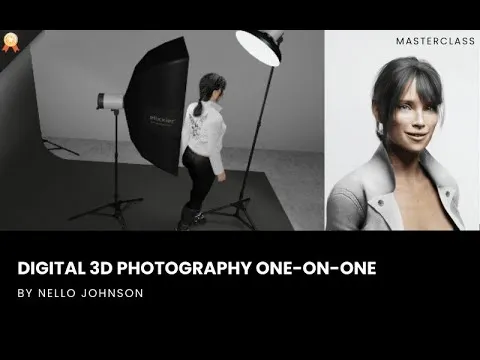
The Digital 3D Photography One-on-One: Set.a.Light 3D Edition

Learn 25 foundational lighting setups and advanced multi-light techniques using digital 3D photography software
2.2 hours
4 Lessons
Practice Files

Access ALL masterclasses with PhotoWhoa PLUS

What You'll Be Able To Create

Master 25 studio lighting setups in a virtual environment and then take that knowledge straight to your real studio with confidence.

Polished Single-Light Portraits

Create clean, professional-looking portraits using foundational setups

Multi-Light Studio Images

Layer key, fill, rim, and accent lights to build portraits with real depth, separation, and mood

Creative Lighting Effects

Produce dramatic looks like silhouette lighting, high-key setups, and colored gel portraits

A Sneak Peek Into The Masterclass

A look at the kind of setups you’ll be able to create using this 3d lighting setup masterclass
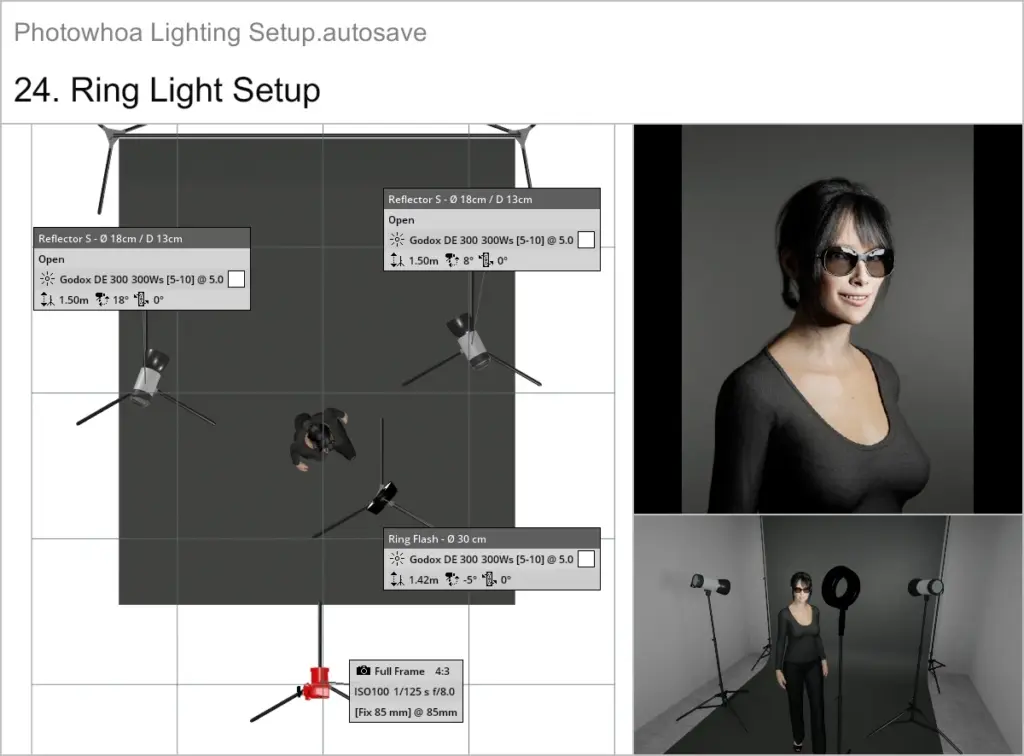
3d photography tutorial showing light positioning and angles
3ds max lighting setup style portrait with dramatic shadows
Studio scene using 3d lighting setup for professional portrait
Digital 3d photography with controlled light and shadow
Lighting setup tutorial showing before and after lighting changes
3d photography tutorial with multiple light sources in studio

What This Lighting Setup Tutorial Is About

Most photographers learn studio lighting through trial and error on set, wasting time, money, and creative energy trying to figure out why a setup isn’t working. Static diagrams and seminar videos can’t show you how light actually behaves in three dimensions. With this masterclass, you’ll be able to:
  • Learn 25 foundational portrait lighting setups from Rembrandt and Loop to Clamshell, Split, and High-Key, each explained and demonstrated in a virtual 3D studio
  • Understand how angle, distance, height, and modifier choice change the mood and depth of every image
  • Build from single-light basics all the way up to advanced multi-light arrangements with key, fill, rim, and accent lights
  • Work with colored gels, grids, softboxes, and background lights to create dramatic, creative effects with intention
  • Translate every virtual setup directly into a real studio blueprint you can follow on your next shoot
You won’t just know what a lighting setup looks like; you’ll understand why it works, so you can make smart decisions on any shoot, in any studio.

What You'll Learn In This Lighting Setup Tutorial

Step-by-step 3D photography tutorial training that takes you from basic single-light portraits to advanced multi-light studio setups.
Digital 3d photography scene with virtual studio lighting setup
25 most useful studio portrait lighting setups
How to control the key variables of every setup
How to choose and use lighting modifiers like softboxes, grids and umbrellas.
How to add fill lights and rim lights to a base setup
How to use colored gels creatively and why color gel lighting works best
How to build a silhouette lighting setup and a high-key look
The camera settings Nello uses for every setup
How to use Set.a.Light 3D as a planning and practice tool.

Lesson Breakdown

Focused lessons designed for practical application. Each lesson builds on the previous, taking you from fundamentals to advanced techniques.
lesson 1

The Digital 3D Photography One-on-One Lesson 1

3m 51s
lesson 2

The Digital 3D Photography One-on-One Lesson 2

1h 2m 7s
lesson 3

The Digital 3D Photography One-on-One Lesson 3

1h 2m 7s
lesson 4

The Digital 3D Photography One-on-One Lesson 4

2m 6s

Continue Your Learning Journey With Guided Path

This masterclass is part of the Lighting & Studio Setup Learning Path: a structured journey designed to help photographers understand professional lighting setups & control light with confidence.

Foundations

Core Techniques

Creative Mastery

Advanced Workflows

Learn how to build better lighting setups and create more polished, professional-looking studio photos.

Who Is This Lighting Setup Tutorial For?

  • Beginner Studio Photographers — Stop guessing at lighting and start every shoot with a clear, tested plan.
  • Intermediate Photographers — Move beyond one or two go-to setups and build a full toolkit of 25 lighting configurations.
  • Photographers Without a Large Studio Space — Every setup in this course is demonstrated in a small studio environment.
  • 3D Artists & Digital Creators — Use the digital 3D photography workflow to plan shoots and visualize complex multi-light arrangements.
Nello Johnson

Expert Instructor

Nello Johnson

Nello Johnson is a professional photographer who specializes in skin retouching photography. He also works in glamor photography. On PhotoWhoa, he is offering his product - Glamour Retouching Photoshop panel- at a discounted price.

View instructor’s classes

Frequently Asked Questions

Yes. The tutorial is built around Set.a.Light 3D’s virtual environment. All project files, setups, and demonstrations require it. You can use the trial version to explore, but full functionality works best with the licensed version.

Yes. The course starts with simple single-light setups and gradually progresses into multi-light arrangements. The 3D virtual studio allows beginners to experiment safely without expensive equipment or studio rental, making the learning curve smoother and more intuitive.

You’ll learn portrait essentials like loop, Rembrandt, butterfly, split lighting, high-key, low-key, rim lighting, fill layering, background lighting, multi-light separation, and mood-based lighting. The course shows how angle, distance, height, and modifiers affect depth, contrast, and emotion.

No. While the course covers pro techniques, you can replicate most setups using basic strobes, speedlights, or continuous lights. Modifier recommendations include affordable equivalents so learners with small home studios can follow along easily.

Yes. The biggest advantage is pre-visualization. You learn to “see” light before touching any gear. This reduces trial-and-error, saves time on set, speeds up client sessions, and ensures consistent results even with complex setups.

Yes. This tutorial is built entirely around a digital 3D photography workflow using Set.a.Light 3D. You’ll learn how to construct, adjust, and refine lighting setups inside a virtual studio—allowing you to experiment with light placement, modifiers, distance, and angles before stepping into a real studio.

Absolutely. The training starts with foundational single-light setups and progressively moves into advanced multi-light configurations. In this second part of the series, you’ll expand on 25 core setups by adding and balancing additional lights to create depth, separation, and professional-level results.

Yes. Photographers will gain a deeper understanding of how light behaves and how to plan shoots with confidence, while 3D artists and visual designers will benefit from realistic lighting principles that translate directly into digital scenes and renders. The concepts apply across both real-world and virtual workflows.

Unlike generic 3D lighting tutorials, this course focuses on real photographic lighting logic, not just software controls. Every setup is taught with practical intent showing why a light is added, how it affects mood and depth, and when to use it. The hands-on, build-and-refine approach mirrors real studio decision-making, making it a true bridge between virtual planning and professional photography execution.

This 3d photography tutorial focuses on hands-on learning with a virtual studio, helping you understand lighting behavior instead of just memorizing setups.

Get PhotoWhoa PLUS

Unlock this masterclass and 70+ more for one low annual price

What's included:

$99

/year

Price locked once you subscribe. Cancel anytime.

Get instant access to ALL masterclasses with PhotoWhoa PLUS

In-Depth Classes
1 +
Hours of Practical Training
1 +
Expert Instructors
1 +

Join photographers worldwide improving their skills with PhotoWhoa PLUS

Become a PhotoWhoa Charter Plus Member

Access With Plus